

Post Detail
Post Detail
Post Detail is the quick-inspection screen that is almost fully read-only. It works well when you want to review content, metadata, or SEO without accidentally changing the form.
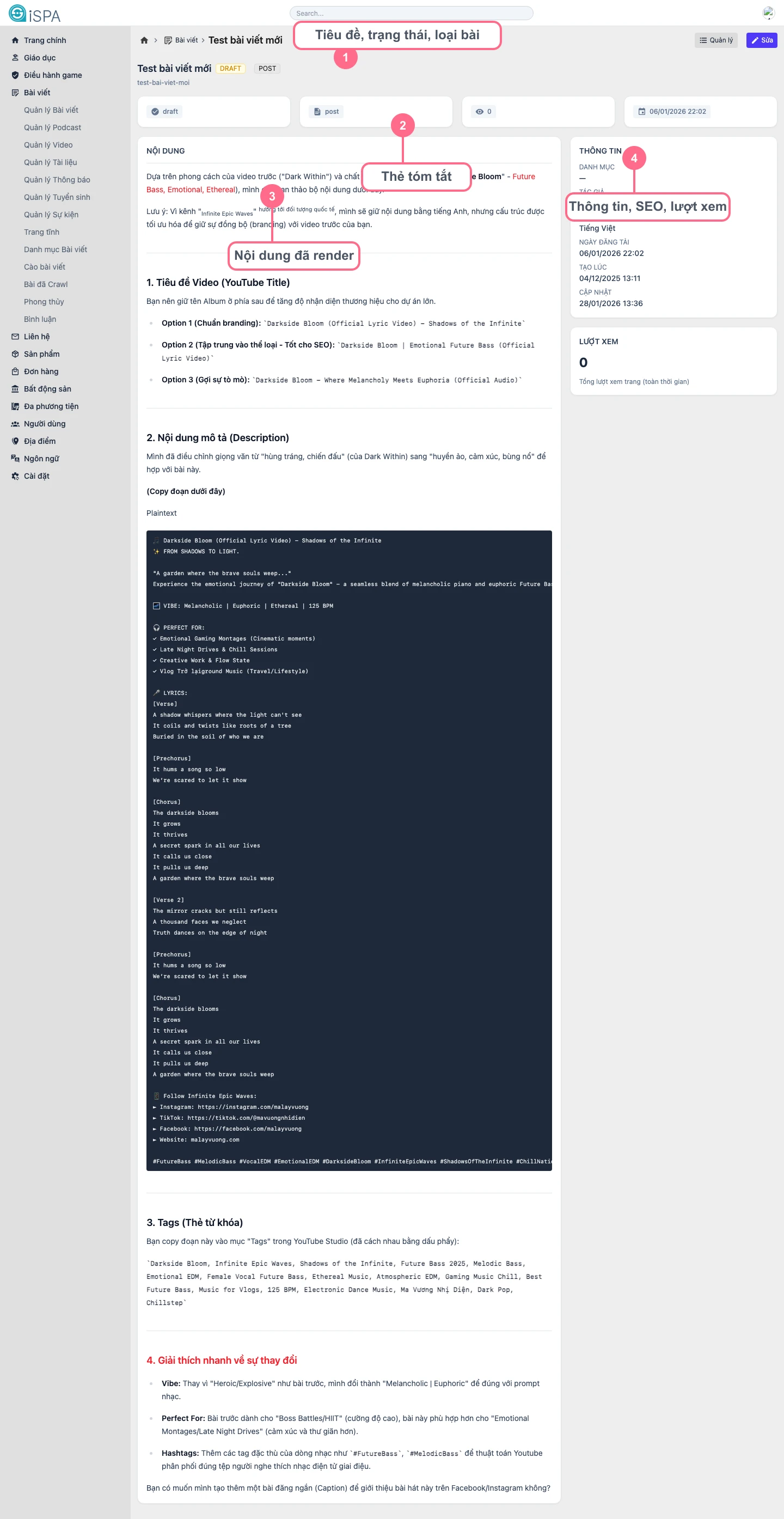
Illustration captured from the local environment on March 14, 2026 using a sample record that already includes rendered content, SEO metadata, and view statistics inside admin.
What does this screen show?
- post title,
status,type,slug, and category at the top summary cardsfor status, content type, publish date, and views- a
Contentsection where you can reread the excerpt and rendered body - a right-side information column with thumbnail, metadata, SEO, and total views
- quick buttons that move you back to
Manageor intoEdit
When should you open this screen?
- right after saving, when you want to verify the result yourself
- before QA or before sending a record to someone else for review
- when you want to reread the content without touching the edit form
- when you need to compare metadata, category, language, or SEO
30-second review flow
- Check
statusto make sure the record is in the correct state. - Review
typeandcategory. - Check the
slug. - Review the thumbnail and
SEO. - Scroll through the rendered content to catch layout or formatting issues.
If the frontend display looks wrong
- review
statusandpublished_at - review
category - review display flags in Update Post
- for video or audio posts, review the source file or URL again