

Crawled Posts
Crawled Posts
In the current admin version, Crawled Posts is no longer only a list of crawled records. It now works as the coordination board for the full crawl workspace: URLs, parser runs, staging summary, and even crawl source configuration.
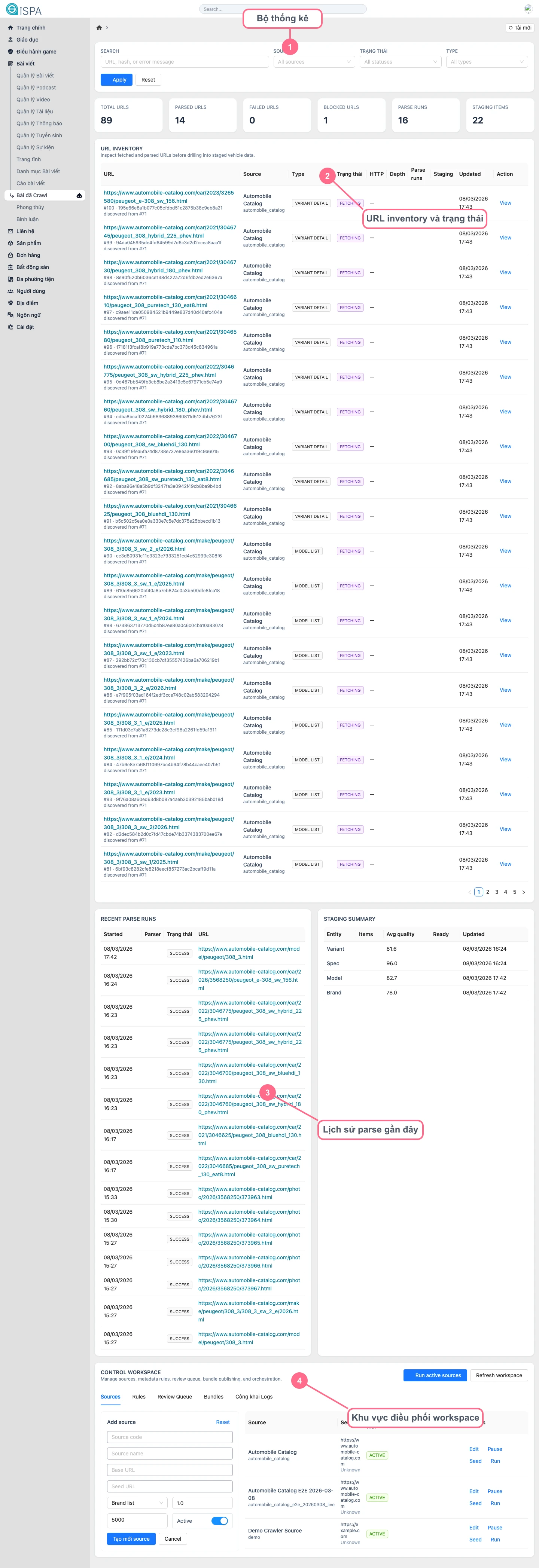
Illustration captured from the local environment on March 14, 2026. The crawl workspace now contains sample URLs, parser runs, and staging summaries so you can understand how the real pipeline should be read.
What is this screen for?
- monitoring the total number of URLs inside the crawl workspace
- filtering URLs by source, status, or data type
- reviewing staging quality before sending data further down the flow
- configuring and coordinating crawl sources through
Control Workspace
Main areas
Advanced filters: filter bysource,status,type, or URL keywordStat cards: total URLs, parsed URLs, failed URLs, blocked URLs, parse runs, and staging itemsURL inventory: the central URL list that tells you how far the pipeline has progressedRecent parse runs: history of recent parser executionsStaging summary: summary of extracted entities and their average qualityControl Workspace: manageSources,Rules,Review Queue,Bundles, andPublish Logs
Fast way to read one crawl workspace
- Start with the stat row to see whether the workspace is healthy or whether URL failures are increasing.
- Use filters to narrow the list by source or status.
- Open
URL inventoryto see which URLs are parsed, pending, or failing. - Review
Recent parse runsif you suspect the parser failed recently. - Check
Staging summaryto see whether the extracted data is clean enough. - If the source configuration needs changes, open
Control Workspace.
When should you go into Control Workspace?
- when you need to add a new crawl source
- when you need to adjust a seed URL
- when you need to change review thresholds or logic
- when you need to check whether a bundle is ready to publish
Operational notes
- do not push too many new URLs before reviewing
sourceandseed - if
Failed URLsorBlocked URLsstarts growing quickly, review the source first - when
Staging summaryshows low quality, review carefully before syncing further
This screen is more technical coordination than editorial writing
If your goal is to edit a single article, use Post Crawl or open the specific record detail. Crawled Posts is better suited for managing the pipeline and source batches.